
 Search
1Select theme color
If you want the promotional module to appear more subtle on your website, consider using the light theme. If you'd like to draw more attention to it, opt for the dark theme.

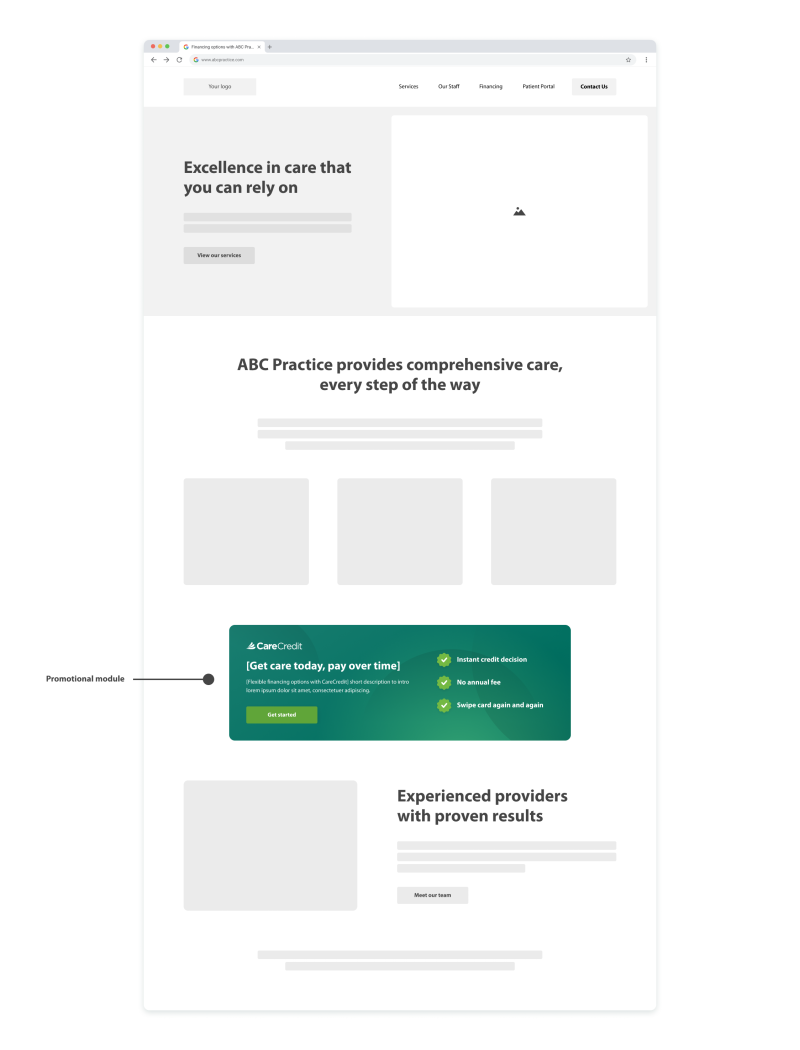
Enrolled providers can add a customizable, responsive module to their website to let patients and clients know about financing with CareCredit.
See a preview of the promotional module below. Then, copy the HTML code to your clipboard by clicking the copy button to the right of the code.
[Flexible financing options with CareCredit] short description to intro lorem ipsum dolor sit amet, consectetuer adipiscing.
Get Started Copied to clipboard
Navigate to your website editor dashboard and locate the place where you’d like to embed the promotional module. Then, add the content element labeled HTML, Embed Code, or Custom HTML. Paste your custom code into that element and publish the page.
Steps may vary based on your website editor. For detailed instructions, view the guide.

The promotional module is a simple way to add CareCredit financing information to a section of your website without redesigning the page.
This fully responsive module adjusts to any screen size and features easy-to-read benefits and a built-in call-to-action connected to your custom link. Place it on high-traffic pages such as your homepage, services page or payment options page.

(800) 859-9975
Option 1, then 6, Monday – Friday: 8:00 AM – 6:30 PM (EST)
For other inquiries, follow the prompts:
Monday – Saturday: 7:30 AM – 2:00 AM (EST), Sunday: 9:00 AM – 2:00 AM (EST)